
GitLab Omnibus Runner Setup: Same Box or Separate, and the Traps Either Way
Omnibus installs GitLab and no runner. Whether you put the runner on the same server comes down to memory and blast radius, and if you do, there is a networking trap in gitlab.rb that will waste your afternoon.
The Omnibus package is the easy way to run GitLab: one apt install, one
gitlab.rb, one gitlab-ctl reconfigure, and you have an instance. It bundles
Postgres, Redis, Nginx, Sidekiq, Puma, Prometheus, and a dozen other things.
It does not bundle GitLab Runner.
So the first real question after an Omnibus install is whether the runner goes on the same server, and the answer is more interesting than it first looks.
Should the runner live on the GitLab server?
You can. It works. Plenty of small instances run this way for years without trouble.
The case against is memory and blast radius.
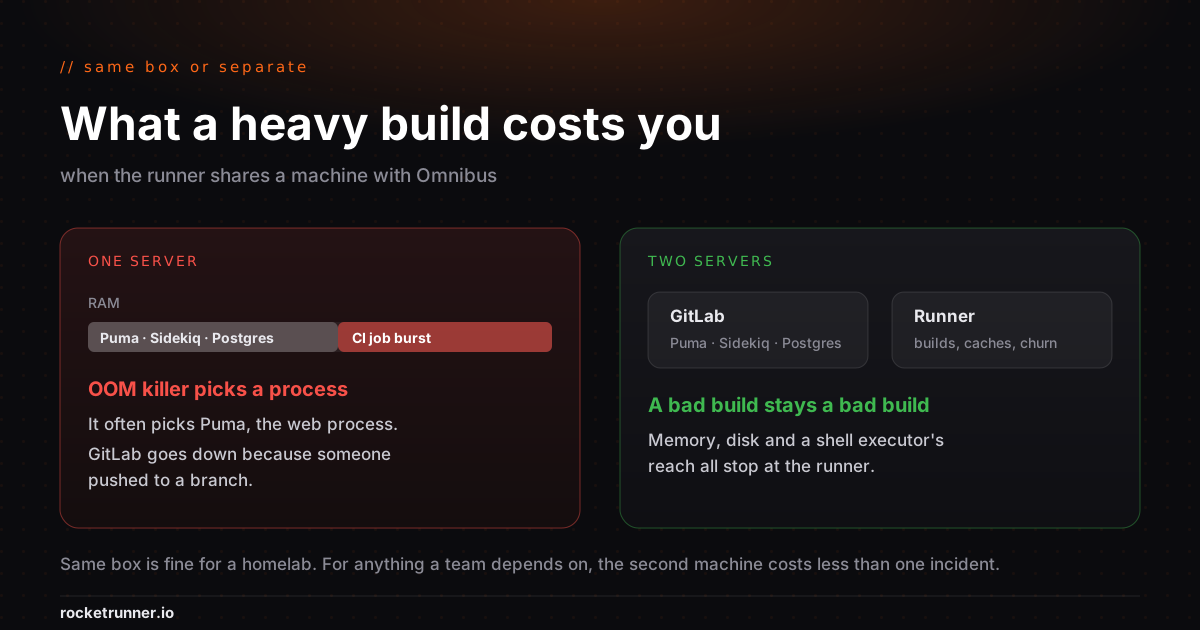
Omnibus is not a light install. A production-ish instance wants 8GB before it has run a single CI job, and Puma and Sidekiq will use what is available. A runner executing a container build with a Node install and a test suite can comfortably take several gigabytes more, in bursts, at unpredictable times.
When those two collide, the failure is not a slow build. It is the OOM killer picking a process, and the process it picks is often Puma. Your GitLab goes down because someone pushed to a branch. The logs will show a memory kill on the web process and nothing at all pointing at CI, which is why this one tends to get diagnosed twice.
There is also the isolation question. With the Shell executor, jobs run as the
gitlab-runner user on the same host as your instance, its configuration, and
its Postgres socket. Anyone who can push a .gitlab-ci.yml can execute commands
on your GitLab server. For a solo instance that may be acceptable. For anything
with contributors it is worth thinking about properly.
Rule of thumb: same box is fine for a personal instance, a homelab, or a single small project. For anything a team depends on, put the runner elsewhere. The second machine costs less than one incident.
If you do put it on the same box
Install the runner package normally. It does not conflict with Omnibus, and it
keeps its own config at /etc/gitlab-runner/config.toml rather than anything
under /etc/gitlab.
Then set a concurrency limit, because the default will happily run more jobs than the machine can hold:
concurrent = 2And here is the trap.
The external_url trap
Omnibus serves GitLab at whatever you set as external_url in
/etc/gitlab/gitlab.rb. When you register a runner on the same host, the
instinct is to point it at http://localhost because that is where the thing
is. Sometimes it even works during registration.
Then jobs fail in ways that make no sense. Artifact uploads 404. Container
registry logins fail. CI_PROJECT_URL comes out as a localhost address that
nothing else can resolve, and any job that hands a URL to another system hands
it a broken one.
The cause is that GitLab generates URLs from external_url, not from how the
runner happened to connect. Mixing the two produces an instance that is
internally inconsistent about its own address.
Register the runner against the same URL your instance actually advertises:
sudo gitlab-runner register \
  --non-interactive \
  --url "https://gitlab.example.com" \
  --token "glrt-XXXXXXXXXXXXXXXXXXXX" \
  --executor "docker" \
  --docker-image "alpine:latest"
If the server cannot resolve its own public hostname, fix that in
/etc/hosts rather than by using a different URL in the runner. Keeping one
canonical address is worth more than saving a DNS lookup.
While you are in gitlab.rb, if your instance sits behind a reverse proxy or a
load balancer, make sure nginx['real_ip_trusted_addresses'] lists it.
Otherwise every request appears to come from the proxy, which quietly breaks
rate limiting and makes the audit log considerably less useful.
Any change to gitlab.rb needs:
sudo gitlab-ctl reconfigureDocker executor on the same host
If Omnibus and Docker share a machine, keep an eye on where images land.
/var/lib/docker grows without asking, and on a default partition layout it
grows into the same filesystem as your GitLab data and backups.
A disk that fills up takes down Postgres, and a Postgres that cannot write takes down GitLab. The first visible symptom is usually a 500 on a page that has nothing to do with CI.
Give Docker its own volume, or set a cleanup policy and actually verify it runs:
[[runners]]
  [runners.docker]
    disable_cache = false
  [runners.cache]
    MaxUploadedArchiveSize = 1073741824
Then add a scheduled docker system prune and check the disk a week later. The
policy that was configured but never ran is a common enough finding to be worth
the two minutes.
Backups do not include your runner
gitlab-backup create covers repositories, the database, uploads, and
configuration for the GitLab application. It does not cover
/etc/gitlab-runner/config.toml, and it does not cover anything about how the
runner machine was built.
So if you restore from backup onto new hardware, your instance comes back and your CI does not. Back up the runner config separately, or accept that you will re-register from scratch and write down what the executor settings were.
What this looks like a year in
None of the above is difficult. That is rather the point: it is a long tail of small, individually reasonable pieces of maintenance that never quite finish.
Runner versions track GitLab upgrades. Disks fill. Certificates renew. Someone adds a second runner for a project with different requirements, and now there are two. An engagement ends and the runner that served it is still sitting there, still registered, still holding a checkout of a client's source.
That last one is why agencies tend to reach for a different arrangement. One isolated runner per client, destroyed when the contract ends, is a much easier thing to say in a security review than "we have a shared box and we clean it up".
If that shape fits how you work, runners for self-hosted GitLab covers renting a dedicated VM registered against your own Omnibus instance, with the OAuth application on your GitLab and revocable by you. The instance stays exactly where it is.
// Keep reading