
This Job Is Stuck Because You Don't Have Any Active Runners Online: Every Cause
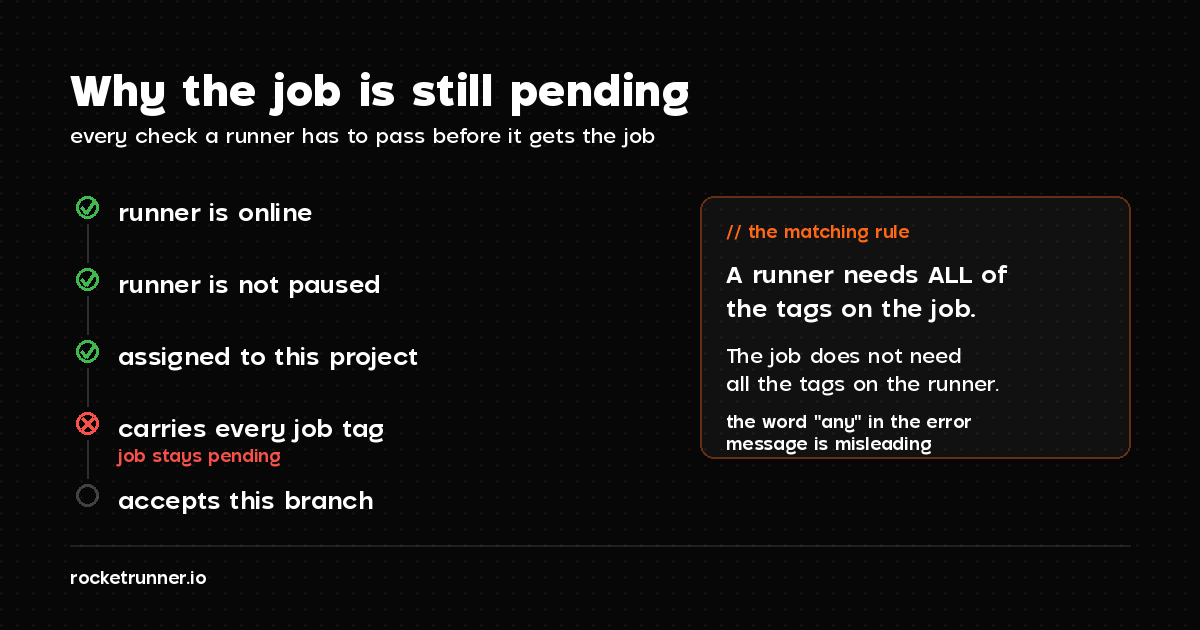
The message is about matching, not health. Your runner can be online and idle and still be skipped, because a job only runs on a runner that carries every tag it asks for, accepts the branch it came from, and is actually assigned to the project.
Your pipeline sits at pending, and GitLab tells you:
This job is stuck because you don't have any active runners online with any of these tags assigned to them.
You check your runners. One is green. It is idle. Nothing is running on it. So the message looks wrong.
It isn't. GitLab is not telling you the runner is down. It is telling you that no runner matched this job, and matching has more conditions than most people expect.
What the message actually means
Runners poll GitLab for work, and GitLab hands a job to a runner only when every one of these is true:
- The runner is online, meaning it has contacted GitLab recently
- The runner is not paused
- The runner is assigned to this project, directly or through its group
- The runner carries every tag the job asks for
- The runner accepts jobs from this kind of branch
Fail any one of them and the job stays pending. The runner sitting idle in your list is idle precisely because it was skipped.
That reframes the problem. You are not debugging a broken runner. You are looking for the one condition that doesn't line up.
The 30-second check
Before reading further, compare two things:
# What the job asks for (in .gitlab-ci.yml)
grep -A3 "tags:" .gitlab-ci.ymlThen open Settings > CI/CD > Runners in the project and read the tags on the runner you expect to pick the job up.
If those two lists don't match exactly, you have found it. That is the cause roughly half the time, and the next section is the whole story.
Cause 1: the tags don't match
This is the most common cause, and the trap is in the word any in GitLab's error message. The matching rule is the opposite of what the wording suggests:
A runner must have all of the tags listed on the job. The job does not need all of the tags on the runner.
So a job asking for two tags will not run on a runner that has only one of them:
build:
  tags:
    - docker
    - linux          # runner must have BOTH
  script:
    - make build
A runner tagged only docker is skipped. Silently. It stays green and idle.
You have three ways out:
Watch for typos and case. Docker and docker are different tags, and a
trailing space in the CI file counts.
Cause 2: the job has no tags, and your runner won't take untagged jobs
The mirror image of cause 1. If your job has no tags: at all, only a runner
with Run untagged jobs enabled will accept it. That setting is off by
default for tagged runners, which catches people who tag a runner and then
forget the toggle.
Find it in the runner's edit screen: Run untagged jobs, indicates whether this runner can pick jobs without tags. Tick it, or give the job a tag the runner carries.
Cause 3: the runner is paused
A paused runner still appears in the list with its tags intact. It just never receives work. Check for the pause icon next to the runner and resume it.
Worth checking early because it costs five seconds and it is invisible in the error message.
Cause 4: the runner is not really online
"Online" in GitLab means the runner contacted the API within the last couple of minutes. A runner whose process died still shows its last-known state for a short while, and a runner that was created in the UI but never installed shows as never having connected at all.
If your runner has never made contact, the problem is upstream of tags and this message is the wrong thing to debug. Start with GitLab Runner Has Never Contacted This Instance, which covers that case end to end.
Cause 5: the branch is not protected, but the runner only accepts protected branches
Runners can be restricted to protected branches. Turn that on, and jobs from every other branch are skipped with this same message.
The failure mode is confusing because it is intermittent by branch: your
main pipeline runs, and the identical pipeline on a feature branch hangs. If
your pipeline works on one branch and not another, check this before anything
else.
Look for Indicates whether this runner can pick jobs from protected branches in the runner settings.
Cause 6: the runner isn't assigned to this project
Three separate ways this happens:
- A project runner registered to a different project. Project runners serve exactly the project they were registered for, and it isn't shared by default.
- A group runner the project has switched off. Group runners cover their group's projects, but a project can disable them locally.
- Instance runners disabled for the project. GitLab.com's shared runners can be turned off per project, usually by someone standardising on self-hosted runners months ago.
All three live under Settings > CI/CD > Runners, which lists runners in scope for the project. If the runner you're thinking of isn't in that list, it was never a candidate.
Cause 7: you're out of compute minutes
On GitLab.com's Free tier you get 400 compute minutes a month. When they run out, instance runners stop accepting your jobs, and the symptom is a pending job rather than a clear billing error.
Check Settings > Usage Quotas. If the minutes are gone, your options are to buy more, wait for the monthly reset, or attach a runner of your own, which doesn't consume the quota at all.
Putting it in order
Work down this list. Each step is cheaper than the one after it:
- Is the runner paused? Resume it.
- Do the job's tags all exist on the runner? Match them exactly.
- Does the job have no tags? Enable Run untagged jobs.
- Does it work on
mainbut not elsewhere? Check the protected-branches setting. - Is the runner in the project's runner list at all? If not, assign or register it.
- Has the runner ever contacted GitLab? If not, it's an installation problem.
- Any compute minutes left? Check Usage Quotas.
Notably, none of these are about your job's script, your Docker image, or your
stages. Those produce failing jobs, not pending ones. A stuck job is always a
matching problem.
Why this keeps happening
Every cause above is a piece of configuration that has to agree with another piece of configuration somewhere else. Tags in a YAML file have to agree with tags typed into a web form. A branch protection rule has to agree with a runner toggle. Nothing validates the pair, so they drift, and the only feedback is a job that never starts.
Dedicated runners cut the surface area. When a runner is provisioned for a specific project and registered automatically, its tags and project assignment are set at creation rather than typed twice, and it isn't sharing a quota with anyone.
That's what we do at RocketRunner: an isolated VM per runner, registered with your project or group for you, billed by the minute with a fixed monthly cap. See how dedicated runners work, or start your free trial and skip the tag-matching archaeology.
// Keep reading