
GitLab Runner Has Never Contacted This Instance: Every Cause and Fix
The message means registration worked but the runner never called home. That narrows the problem to five things: the process isn't running, it's reading a different config file, it can't reach your URL, TLS is failing, or the token belongs to someone else.
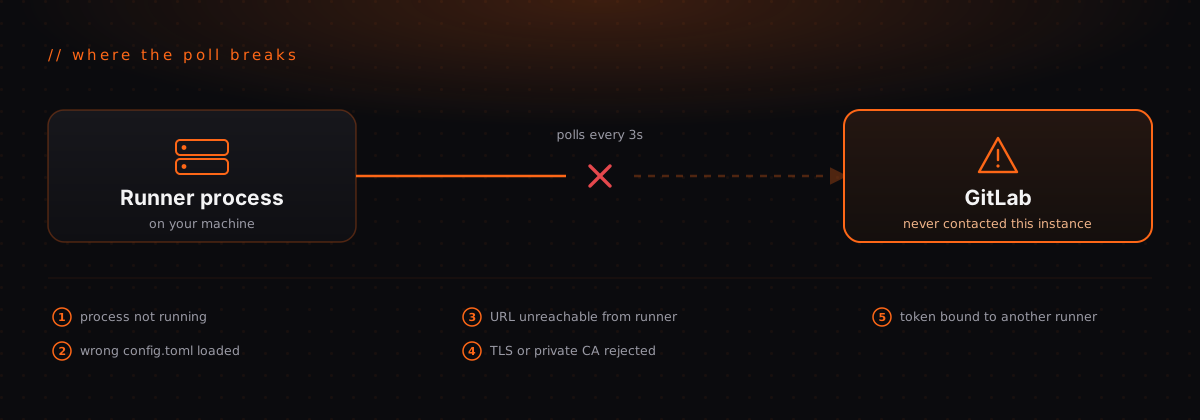
You created a runner, GitLab listed it, and next to it sits a grey warning: This runner has never contacted this instance. Your pipeline sits pending, and nothing in the UI tells you why.
The good news is that this message is far more specific than it looks. It rules out most of what you might be about to check.
What the message actually means
GitLab runners poll. The runner process asks GitLab for work every few seconds
(check_interval, three seconds by default). GitLab never pushes anything to
the runner, and it never opens a connection to it.
So this warning means exactly one thing: a runner record exists in GitLab's database, and no runner process has ever polled it.
That splits the problem cleanly in two:
- The runner record was created. Your token was valid at creation time, and GitLab can see the runner exists.
- No process has ever reached the API. Either nothing is running, or something is running and cannot get to GitLab.
Every cause below is a variation on the second half. Notably, none of them are
about your .gitlab-ci.yml, your tags, or your job configuration. Those cause
different symptoms. Don't start there.
Cause 0: you haven't installed the runner yet
Since GitLab 16, you create a runner in the UI first, and it appears in the list
immediately with an authentication token starting with glrt-. The runner row
exists before any machine has been told about it.
This is by far the most common reason for the warning, and it is not a bug. The UI is showing you a runner you created but haven't installed. If you stopped after copying the token, that's the whole story.
Cause 1: the process isn't running
Check before assuming anything more interesting:
sudo systemctl status gitlab-runner # package install
docker ps -a | grep gitlab-runner # container installA container that exited seconds after starting almost always means a malformed
config.toml. Read the logs rather than restarting it:
sudo journalctl -u gitlab-runner -n 50 --no-pager
docker logs gitlab-runner
Cause 2: the service reads a different config.toml
This one wastes the most time, because everything looks correct.
gitlab-runner register writes to a config file that depends on which user ran
it. The service reads a path that depends on how it was installed. When those
disagree, registration genuinely succeeded and the running service genuinely
never learned about it.
Confirm which file the runner actually loaded, and confirm your runner is in it:
sudo grep -c '\[\[runners\]\]' /etc/gitlab-runner/config.tomlZero means you registered into a different file. Re-register with sudo, or
point the service at the file you already wrote.
Cause 3: the runner can't reach your GitLab URL
Registration and polling are the same API, so if registration worked from that
machine, the network path worked at least once. That makes this cause more
likely when someone else registered the runner, when you copied a config.toml
between hosts, or when the runner lives in a different network segment.
Test from the runner itself, not from your laptop:
curl -v https://gitlab.example.com/api/v4/versionFor self-managed instances, the usual failure is a URL that only resolves in
some networks. An internal hostname, a VPN-only address, or a private IP will
work from your desk and fail from a runner in a different subnet or a cloud
region. The url in config.toml has to be reachable from the runner, which
is not always the same address you type into your browser.
Also check outbound egress. Plenty of hardened networks allow inbound HTTPS to GitLab and quietly drop outbound traffic from build hosts.
Cause 4: TLS
Self-signed certificates and private CAs fail here constantly, and the error in the runner log is often a single line about certificate verification that scrolls past.
sudo gitlab-runner --debug runRun it in the foreground and watch. If you see a certificate error, give the runner the CA explicitly:
[[runners]]
  url = "https://gitlab.example.com/"
  tls-ca-file = "/etc/gitlab-runner/certs/ca.crt"
The file has to be readable by the user the service runs as, which is often not the user that created it.
Cause 5: the token isn't what you think
A few variations, all of which produce a runner record that never polls:
- The authentication token was copied from a different runner, so the process is happily polling as a runner you're not looking at
- The token was revoked or the runner was deleted and recreated in the UI, and the machine still holds the old one
- No
--urlwas passed during a non-interactive registration, so the runner defaulted tohttps://gitlab.com/and is contacting the wrong instance
That last one is worth checking early on self-managed setups. Open
config.toml and read the url line before anything else.
Fast diagnostic order
gitlab-runner verify is the fastest single test. It performs the same
authenticated call that polling uses, and it prints the failure instead of
burying it in a log.
Why self-managed instances get hit hardest
On GitLab.com, the URL is public, the certificate is valid, and only one side of the connection is yours. Most of this list collapses to "is the runner running."
On a self-managed instance, you own both ends. The reverse proxy in front of
GitLab, the external_url it was configured with, the certificate chain, the
DNS split between internal and external views, and the egress rules on the
build host are all yours to get right, and they only have to disagree slightly
before the runner goes quiet without a useful error.
That's the real cost of self-hosting, and it rarely shows up in the plan. The server is cheap. The afternoon spent proving that a runner can reach your own GitLab is not.
The takeaway
Work from the message outward. It already told you registration succeeded, so skip your CI config and check the five things above in order. Most of the time it's cause 0 or cause 2, and both are five-minute fixes once you stop looking at the pipeline.
If you'd rather not do this again, RocketRunner provisions the machine, installs the runner, and connects it to your GitLab for you, including self-managed instances. Dedicated, isolated, and destroyed when you delete it.
Start your free trial and skip the config.toml archaeology.
// Keep reading
Related posts
// gitlab
We Cut Our GitLab Build Time by 59% With One Change
May 16, 2026 · 3 min read
// gitlab
Cheap Dedicated CI/CD Runners for GitLab: Shared vs Self-Hosted vs Rented
May 9, 2026 · 3 min read
// gitlab
Self-Managed GitLab, Managed Runners: Keep Your Code In-House Without Running CI
Jul 21, 2026 · 5 min read