
Adding an AI Coding Agent to GitLab: Claude Code, OpenCode, or @rocket
The agents are broadly interchangeable. What differs is the setup. Running Claude Code or OpenCode yourself means your YAML, your keys, and your runners. @rocket sets all of that up for you and runs it on a dedicated runner it provisions.
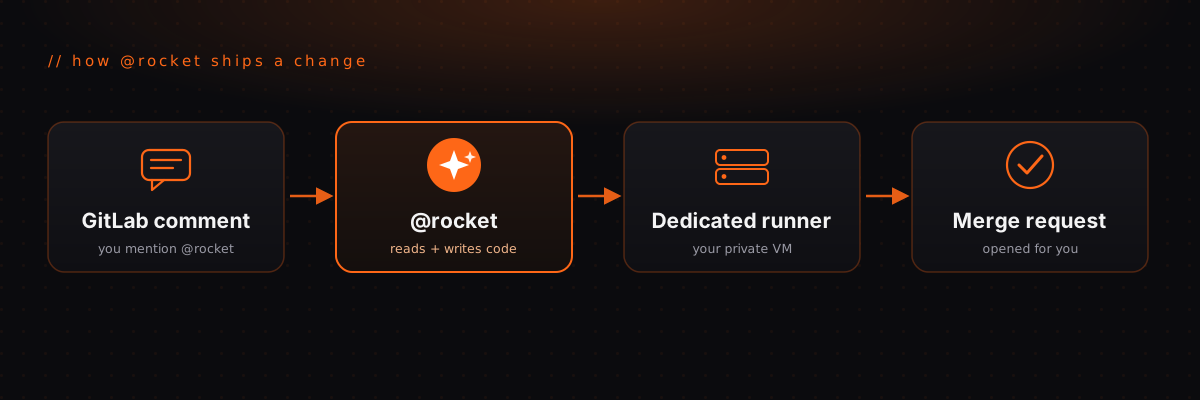
You want the same thing from any of them. Mention an agent in a GitLab issue or merge request, it reads your code, makes the change, and opens an MR. The agents themselves are broadly similar, and most wrap the same underlying models. So the real question isn't which agent. It's how much you have to wire up to get there, and whose machine the job runs on.
Here's how doing it yourself with Claude Code or OpenCode compares to letting @rocket handle the plumbing.
The setup, side by side
The pattern is simple. The two do-it-yourself options are bring your own YAML, your own key, and your own runner. @rocket keeps the same building blocks but sets them up for you and runs them on infrastructure it provisions.
Running Claude Code yourself
Claude Code can run inside your GitLab pipeline. The fast path is a job in
.gitlab-ci.yml plus a token stored as a masked CI variable:
# .gitlab-ci.yml (illustrative minimal setup)
claude:
image: node:20-alpine
script:
- npm install -g @anthropic-ai/claude-code
- claude --print "$CI_MERGE_REQUEST_DESCRIPTION"
# ANTHROPIC_API_KEY (or CLAUDE_CODE_OAUTH_TOKEN) goes under
# Settings > CI/CD > Variables, masked.You run claude setup-token, paste the resulting sk-ant-oat01-… token into
your project's CI/CD variables, and the job runs on whatever runners your
project already has. It works well if you're happy owning the pipeline and the
credentials, and you already have runner capacity.
Running OpenCode yourself
OpenCode also runs in your GitLab pipeline. You add a community CI/CD component to your config and store your OpenCode auth as a File-type CI variable:
# .gitlab-ci.yml (illustrative)
include:
  - component: gitlab.com/<namespace>/gitlab-opencode/opencode@main
Then you mention @opencode in a comment and it runs in the pipeline, opening a
branch and an MR with its changes. Same shape as before: your YAML, your
credentials, your runners.
What @rocket does instead
You connect a GitLab project, paste your Claude credential once, and click Enable. Behind that click, RocketRunner:
- Scans the repo through the GitLab API to pick up your language, framework, and build and test commands.
- Commits a managed
.gitlab-ci.ymlto a dedicatedrocketrunner/agentbranch, so nothing changes on your default branch and there's no YAML for you to maintain. - Stores your credential as a masked CI variable for you, so you never open GitLab's CI settings.
- Provisions a dedicated runner, an isolated Hetzner VM rather than a shared queue.
- Registers a webhook so
@rocketmentions in comments trigger a run.
After that, mention @rocket on the first line of any issue or merge request
comment and it goes to work. On an issue it opens a branch and a merge request.
On an MR it commits to that MR's branch. Ask it to review and it leaves inline
comments without touching your code.
You still bring your own Claude access. Connect a Claude subscription token or an Anthropic API key, whichever you prefer. The difference is you hand it over once, and RocketRunner wires up everything around it. No per-seat AI tax, no key living in your CI settings.
The part everyone skips: the runner
Both do-it-yourself options quietly assume you already have runners. That's the catch. GitLab's shared runners mean your agent's jobs wait behind everyone else's on shared infrastructure. Self-hosting fixes the isolation but hands you a server to patch, upgrade, and clean up forever.
@rocket treats the runner as part of the product. Enabling the agent provisions a dedicated, isolated runner at the same time, billed by the minute with a fixed monthly cap. The agent and the machine it runs on arrive together, which is the thing the do-it-yourself paths can't hand you in one step. See Dedicated GitLab Runners for how that side works on its own.
One engine today, room for more
@rocket runs on Claude Code today. The provider is a pluggable part of the design rather than a hard dependency, so more engines can follow without changing the setup or the dedicated runner underneath. For now, if you want Claude opening merge requests on private infrastructure, that's exactly what it does.
So which should you pick?
- You already run your own runners and like living in
.gitlab-ci.yml? Wiring up Claude Code or OpenCode yourself is a fine path. You keep full control of the pipeline. - You want an agent opening merge requests today, on an isolated runner, without maintaining YAML, credentials, and servers? That's what @rocket is for.
Both get you the same result in the merge request. The only question is how much plumbing you want to own to get there.
Ready to skip the setup? Mention @rocket in your next merge request, or
start a free trial.
// Keep reading
Related posts
// gitlab
GitLab CE Comes Without a Runner: Why Nothing Executes Your Pipelines
Aug 12, 2026 · 6 min read
// gitlab
How to Add a Runner to Self-Hosted GitLab: The Full Walkthrough
Aug 11, 2026 · 5 min read
// gitlab
GitLab Omnibus Runner Setup: Same Box or Separate, and the Traps Either Way
Aug 10, 2026 · 5 min read