
Self-Managed GitLab, Managed Runners: Keep Your Code In-House Without Running CI
Self-hosting is treated as all or nothing, but the repository and the build compute are separate decisions. Keep the instance in your perimeter, rent the runners, and you drop the ops burden without giving up the reason you self-hosted.
You run your own GitLab for a reason. Maybe a client contract requires it, maybe your auditors asked where the source lives, maybe you just don't want your company's code sitting on someone else's SaaS.
Whatever the reason, it was almost certainly not "I want to maintain CI runners." That part came attached.
Self-hosting is two decisions, not one
The conversation usually runs as if there are two options: accept GitLab.com, or run everything yourself. That framing hides a split that matters.
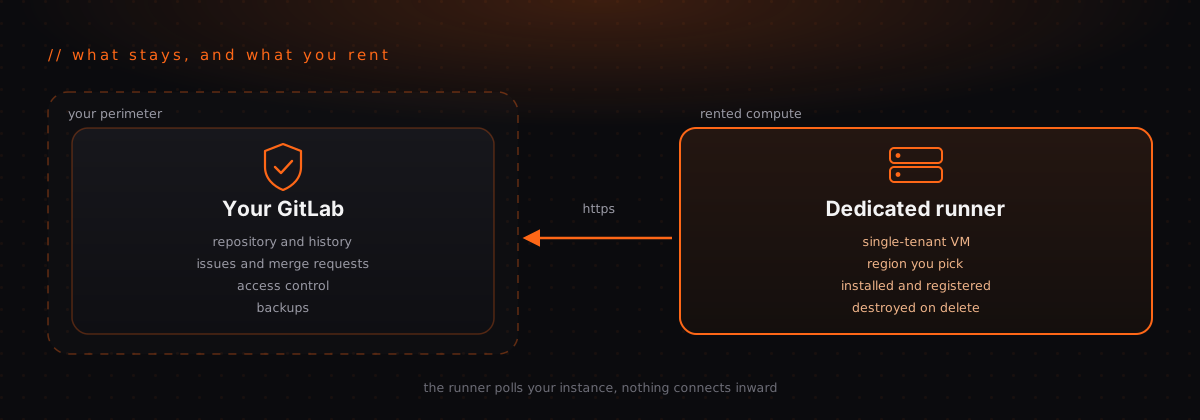
Where the repository lives is the decision your compliance requirements actually care about. Source code, full history, issues, merge requests, access control, backups. This is what an auditor asks about, and what a data residency clause is written against.
Where builds run is a different question. A runner is compute that clones your repo, executes a job, and reports back. It's infrastructure, not a system of record.
Most teams answer both questions at once, keep both, and then spend their Tuesdays on the second one.
What you keep, and what you can hand off
Nothing in the top half moves. That's the point.
Being straight about what a runner sees
A runner checks out your source. Anyone claiming otherwise is selling something.
So the honest question isn't whether build compute touches your code. It's what kind of machine touches it, and who else is on that machine.
Shared runners are multi-tenant. You don't choose the hardware, you don't know what ran on it before your job, and you can't point at it in an audit. A dedicated runner is a single-tenant VM: yours alone, in a region you picked, destroyed when you delete it. That's a posture you can actually describe to a client or an auditor, which a shared runner never was.
If your rules forbid third-party compute from touching source at all, that's a real constraint and this isn't for you. Keep running your own runners inside the perimeter. The rest of this post assumes you're allowed to rent a machine.
The requirement nobody mentions upfront
Your GitLab instance has to be reachable from the runner over the public
internet, on https.
That's not a preference, it's how the connection works. The runner polls your instance for jobs, and RocketRunner calls your instance's API to register it. Both require a public hostname that resolves to a public address. Instance URLs pointing at private or internal addresses are rejected.
So this fits if your GitLab is on a real domain with a valid certificate, which covers most self-managed instances at companies and agencies. It does not fit if your instance is air-gapped, VPN-only, or bound to a private network. In those cases you need runners inside the perimeter, and no hosted service can help.
Better to know that in paragraph six than after signing up.
How connecting actually works
Once per instance, an administrator creates an OAuth application on your GitLab and pastes the client ID and secret back. You can also connect with a personal access token if you'd rather not create an application.
From there:
- Point RocketRunner at your instance URL
- Authorize it against your own GitLab, not gitlab.com
- Pick a server size and region
- It provisions the VM, installs the runner, and registers it with your instance
Your credentials stay yours. The OAuth application lives on your GitLab, and you can revoke it there whenever you want, without asking anyone.
Why this is coming up now
Two things are pushing teams toward self-managed instances at the same time as they're getting tired of running CI.
NIS2 reached full effect this year, with audit obligations landing across member states. And the CLOUD Act means US-owned providers can be compelled to produce data regardless of which country the servers sit in, which is why "our data is in an EU region" stopped being a sufficient answer for a lot of European legal teams.
That combination pushes the repository in-house. It doesn't say much about build compute, which is why the split above is worth making deliberately instead of by default.
Servers run on Hetzner, a German company, with regions in Falkenstein, Nuremberg, Helsinki, Ashburn, and Hillsboro. Pick a European region and both the provider and the hardware stay in the EU.
The case this fits best
Agencies and consultancies, where the pattern repeats per client.
If you run work for eight clients, several of them on their own GitLab instances, then self-assembly means eight runner fleets, eight sets of credentials, eight machines to patch, and a genuinely unpleasant question every time an engagement ends. One isolated runner per client, billed separately and destroyed at the end of the contract, is a much cleaner story for both you and your client's security review.
That isolation is difficult to retrofit and easy to get wrong, which is exactly why it's worth not building yourself.
The takeaway
Keeping your code in-house and running your own CI runners are separate choices, and most teams only ever made the first one on purpose.
Keep the instance. Keep the history, the access control, and the backups. Rent the compute, in a region you choose, on a machine nobody else is using, and delete it when you're done.
Start your free trial and connect your own GitLab instance.
// Keep reading